GitHub Flow Guide
Use this workflow end-to-end, from local clone to production deployment.
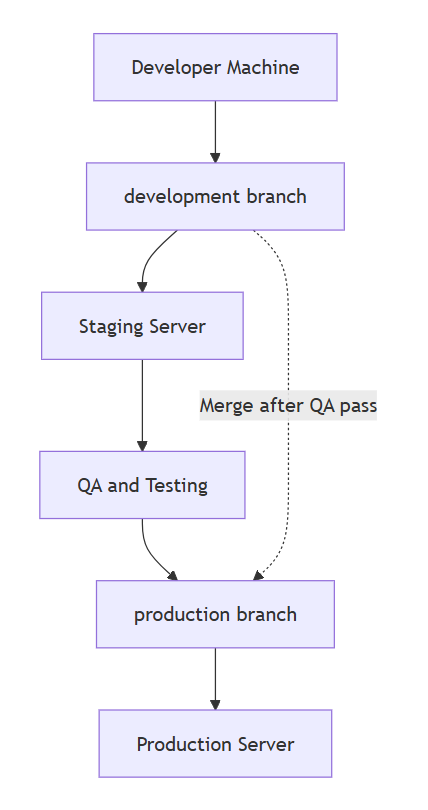
Flow Diagram
Paste the generated flow image at this public path and it will appear below:
public/images/docs/github-flow-deployment.png
Branching Rules
- All new code starts from
development. - Use one feature/fix branch per task.
- Merge feature branches into
developmentthrough PR review. - Deploy
developmentto Staging for QA. - Merge
developmentintoproductiononly after QA pass. - Never push untested code directly to
production.
Local Setup and GitHub Flow Commands
1. Clone and prepare local repository
git clone <repo-url>
cd scienceofspeed.com-development
git checkout development
git pull origin development
composer install
2. Create and work on a feature branch
git checkout -b feature/<ticket-or-short-description>
# make code changes
git add .
git commit -m "feat: <short description>"
git push -u origin feature/<ticket-or-short-description>
3. Open PR to development
- Open a Pull Request:
feature/...->development. - Address review comments.
- Merge after approval.
4. Sync local development branch after merge
git checkout development
git pull origin development
Deployment Environments
⚠️ Internal use only. Do not share publicly.
Production
- IP:
173.249.147.100 - User:
a6579d82_4 - Password:
<set by admin>
- SSH:
ssh a6579d82_4@173.249.147.100Staging
- Host:
eda61e3300.nxcli.io - User:
a3e6d168_1 - Password:
<set by admin>
- SSH:
ssh a3e6d168_1@eda61e3300.nxcli.ioStaging Deployment (development branch)
# On staging server
cd <magento-root>
git checkout development
git pull origin development
composer install

php bin/magento maintenance:enable
php bin/magento setup:upgrade
php bin/magento setup:di:compile
php bin/magento setup:static-content:deploy -f
php bin/magento cache:clean
php bin/magento cache:flush
php bin/magento indexer:reindex
php bin/magento maintenance:disable
Run QA checks on Staging after deployment.
Promote to Production
1. Merge development into production
- Open PR:
development->production. - Merge only after QA sign-off.
2. Deploy production branch
# On production server
cd <magento-root>
git checkout production
git pull origin production
composer install

php bin/magento maintenance:enable
php bin/magento setup:upgrade
php bin/magento setup:di:compile
php bin/magento setup:static-content:deploy -f
php bin/magento cache:clean
php bin/magento cache:flush
php bin/magento indexer:reindex
php bin/magento maintenance:disable
Standard Magento Deployment Command Sequence
Run these commands in this exact order after code pull/update:
php bin/magento maintenance:enable
php bin/magento setup:upgrade
php bin/magento setup:di:compile
php bin/magento setup:static-content:deploy -f
php bin/magento cache:clean
php bin/magento cache:flush
php bin/magento indexer:reindex
php bin/magento maintenance:disable
Command Explanations
-
php bin/magento maintenance:enable
Enables maintenance mode to prevent customer-facing inconsistencies during deployment. -
php bin/magento setup:upgrade
Applies module schema/data updates. -
php bin/magento setup:di:compile
Regenerates dependency injection and compiled class metadata. -
php bin/magento setup:static-content:deploy -f
Deploys static assets (JS/CSS/templates) for storefront/admin. -
php bin/magento cache:clean
Cleans Magento cache types. -
php bin/magento cache:flush
Flushes all cache backend entries. -
php bin/magento indexer:reindex
Rebuilds index data for catalog, search, and pricing. -
php bin/magento maintenance:disable
Returns the storefront to normal operation.
Note
UPS module handling:
composer installwill not add the UPS module package for this project because the current Magento version is lower than the package requirement.- The UPS package is handled manually and placed directly in the
vendorfolder for this environment.